
Electronics · Shop this pick
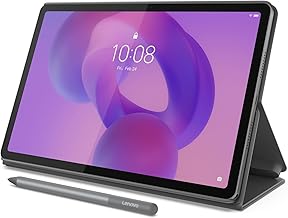
Lenovo Idea Tab - College Tablet - 11″ 2.5K IPS Touchscreen Display - 90hz - MediaTek Dimensity 6300-4 GB Memory - 128 GB Storage - Integrated Arm Mali-G57 MC2 - Tab Pen and Folio Case
Lenovo Idea Tab Review – Built for Campus Durability and Smart Study
The Lenovo Idea Tab delivers a premium student experience with an included pen, folio case, IP52 durability rating, and a sharp 2.5K display. Ideal for note-taking, streaming, and light multitasking, it balances build quality and value better than most budget tablets.
As an Amazon Associate, I earn from qualifying purchases.
Opens Amazon in a new tab with today's listing — prices change often.
What stands out
- IP52 splash and dust protection for campus durability
- Includes Tab Pen and folio case—rare at this price
- 2.5K IPS display with hardware low blue light
- ~7 hours screen-on time with 20W fast charging
Pros
- IP52 splash and dust protection for campus durability
- Includes Tab Pen and folio case—rare at this price
- 2.5K IPS display with hardware low blue light
- ~7 hours screen-on time with 20W fast charging
- 4 years of security patches and 2 OS updates
- microSD expandable up to 2TB
- Quad Dolby Atmos speakers for immersive audio
Cons
- Processor handles only basic tasks
- Tab Pen uses AAAA battery with no wireless charging
- Weak 8MP rear and 5MP front cameras
- Poor display viewing angles
- Dull software interface and cumbersome multitasking
- 4GB RAM may limit long-term viability
Who it’s for
- College students needing note-taking, PDF reading, and streaming
- Light to medium users prioritizing durability and included accessories
- Buyers wanting a sharp display with eye protection and long software support
Who should skip
- Heavy gamers or users needing advanced multitasking
- Those requiring high-quality cameras for photos or video
- Users who prefer sleek, modern UI with seamless cross-device sync
Full review
Introduction
The Lenovo Idea Tab is designed specifically for college students who need a reliable, durable tablet that comes fully equipped for study and play. With an included Tab Pen and folio case, IP52 splash and dust protection, and a vivid 2.5K IPS display with low blue light hardware, it stands out as a practical, long-lasting choice for campus life. While its MediaTek Dimensity 6300 processor limits it to basic tasks, the tablet shines in durability, display quality, and included accessories—making it a compelling value for students focused on note-taking, reading, and streaming.
Key Features / Specs
- Display: 11-inch 2.5K IPS touchscreen (2560×1600), 90Hz refresh rate, 500 nits peak brightness, 72% NTSC color, TÜV Rheinland Low Blue Light hardware
- Processor: MediaTek Dimensity 6300 with integrated Arm Mali-G57 MC2 GPU
- Memory & Storage: 4GB RAM (some sources note up to 8GB), 128GB UFS 2.2 storage, microSD expandable up to 2TB
- Battery: 7,040mAh with 20W charging; ~7 hours screen-on time in HD YouTube tests
- Durability: IP52 rating for limited dust and splash protection—a rare feature in this category
- Audio: Quad Dolby Atmos-tuned speakers with stereo separation
- Pen: Included Tab Pen with 4,096 pressure levels, tilt support, powered by AAAA battery (not rechargeable)
- Software: Android 15 (Lenovo ZUI 17), promises 2 major OS updates (to Android 17) and 4 years of security patches
- Connectivity: Wi-Fi 5, Bluetooth 5.2, USB-C 2.0, 3.5mm headphone jack, keyboard connector port
- Cameras: 8MP rear, 5MP front (1080p video)
- Dimensions: 6.9mm thick, polar blue color option
Pros
- Durability: IP52 splash and dust resistance protects against everyday campus hazards
- All-in-One Value: Includes Tab Pen and folio case—rare at this point
- Sharp, Safe Display: 2.5K resolution with hardware low blue light for fatigue-free study
- Good Battery Life: ~7 hours of screen-on time; supports 20W fast charging
- Long Update Promise: 4 years of security patches and 2 OS updates
- Expandable Storage: microSD slot up to 2TB for PDFs, videos, and study materials
- Immersive Audio: Quad Dolby Atmos speakers deliver clear sound for streaming
Cons
- Limited Performance: Processor handles only basic tasks; not suited for heavy gaming or multitasking
- Pen Charging: Tab Pen uses AAAA battery with no wireless charging; must be charged separately
- Weak Cameras: 8MP rear and 5MP front cameras produce unremarkable photos and 1080p video
- Display Viewing Angles: Not brilliant; color and brightness shift at extreme angles
- Software Experience: Interface feels dull; multitasking is cumbersome compared to Samsung OneUI
- RAM Limitation: 4GB RAM may limit long-term viability for complex workflows
Who It's For
- College Students needing a durable, ready-to-use tablet for note-taking, reading PDFs, and streaming
- Light Users who prioritize display quality, included accessories, and splash protection over raw performance
- Budget-Conscious Buyers seeking premium features (pen, case, IP52) without a premium
Value
The Lenovo Idea Tab offers exceptional value by bundling a high-resolution display, quad speakers, IP52 durability, and essential accessories (pen + case) that typically extra on other tablets. While it’s positioned as a higher-end option in its category, the included ecosystem and long update promise justify its relative students focused on durability and study efficiency.
Final Verdict
For college students prioritizing durability, all-in-one convenience, and a sharp, eye-safe display, the Lenovo Idea Tab is a smart buy. Its IP52 rating, included pen and case, and 4-year security update promise make it stand out in the budget segment. However, if you need high-end performance for gaming or advanced multitasking, consider a more powerful alternative. For note-taking, reading, and streaming, this tablet delivers reliable, long-lasting value. See price on Amazon
FAQ
Is the Lenovo Idea Tab durable enough for daily campus use?
Yes, it features an IP52 rating for limited dust and splash protection—a rare durability feature in budget tablets.
Does the Lenovo Idea Tab include a pen and case?
Yes, the Tab Pen and folio case are included in the box, which is uncommon for tablets in this category.
How long does the battery last on the Lenovo Idea Tab?
Real-world tests show about 7 hours of screen-on time when playing HD YouTube at max brightness.
Can I expand the storage on the Lenovo Idea Tab?
Yes, it has a microSD slot that supports up to 2TB of storage expansion.
How long will Lenovo support the Lenovo Idea Tab with updates?
Lenovo promises 2 major OS updates (up to Android 17) and 4 years of security patches.
Check today's price
If this pick fits your needs, confirm the live offer on Amazon before you buy elsewhere.
As an Amazon Associate, I earn from qualifying purchases.
See price on Amazon